Opal card balance and activity
Check your balance and activity online.
Check your balance and activity online.
You can easily check your Opal card balance and activity online.
You can also check your balance at a top up machine, an Opal retailer, on the Opal Travel app or when tapping on and off.
If your Opal card is registered, you can see up to 18 months of Opal card activity for each of your cards.
If you have a stored payment card, you can also manage your top ups and set up auto top up.
If you have not registered your Opal card, you can only see the last 10 Opal card activities when checking your balance, including trips, top-ups and reversals.
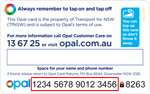
Use the 16 digit number and 4 digit security code on the back of your Opal card to view details.
Create an Opal account to:
Your Opal activity records all card transactions, including trips, top ups, and adjustments.
Activities and balance may take up to 48 hours to appear on the website.
If you forget to tap on or off, you'll be charged the default fare with an 'unknown' origin or destination.
Look for 'TfNSW' and 'Opal' on your bank statement to identify Opal transactions.